Aws Lambda Custom Runtime
Introduction
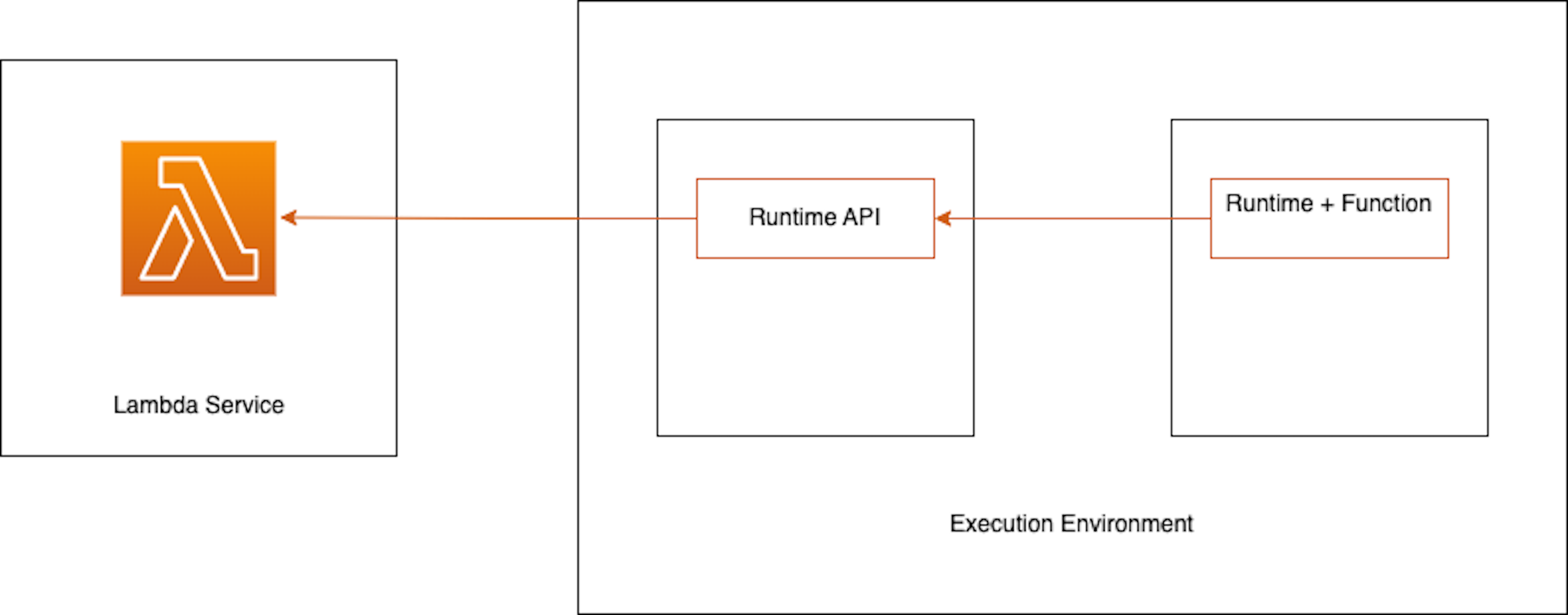
AWS Lambda supports various runtimes like Java, Go, Python , Nodejs, but what if we like to use a language for which lambda doesn’t have a support? What if even for a supported language we want to use a version which is yet not supported by AWS Lambda? Lambda has support for custom runtime. Custom runtime provides an opportunity to define support for runtime which is yet to be supported out of the box. To overcome these scenario AWS Lambda provides and option to create a custom runtime. In this post we will see how it works and how to create a custom runtime.
In JVM world if we want to use graal native image for Lambda, we need to create a custom runtime. Graal native image promises faster startup and less resource consumption.
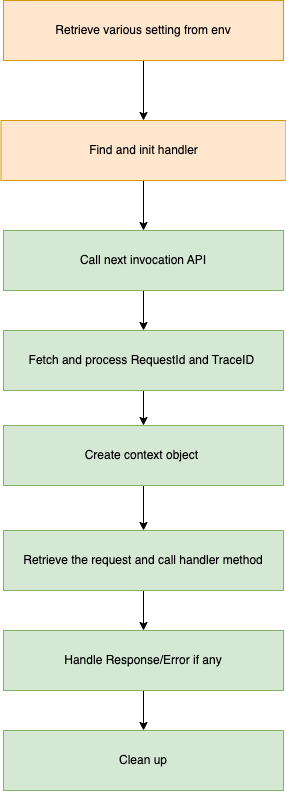
To create a custom runtime we have to provide a file named bootstrap. This file itself can do all the stuff or it can call other code. The custom runtime executes the below steps -
Let’s take an example. Suppose we want to use Java 19 as our lambda runtime. So to support it we need to build a custom runtime.
All the code is accessible here https://github.com/njoysubho/aws-serverless/tree/main/aws-lambda-custom-runtime-java
This is a demo code, for production readiness we need to handle many corner cases, support for different events ans so on. Frameworks like Spring, Micronaut, Quarkus provides support for custom runtime so we need not to write the plumbing code. Also aws lambda has an lambda runtime interface client library which can be used directly to create custom runtime
-
Retrieve handler, runtime api host and port - In lambda environment we have many variable. First thing we need to retrieve is the name of handler. We can get it from env variable
_HANDLER. We also need to find the runtime API host and port we find it from env variableAWS_LAMBDA_RUNTIME_API. -
Init Handler - Now that we have the handler class and method name we have to initialize it.
-
Get next event by calling next invocation api - To receive incoming request we need to make a call to
/runtime/invocation/next. This API is provided by lambda service itself we need to retrieve the host and port to make the API call. An example response looks like below
{
    "id":"83086da1-9d07-4151-9f7f-2654fcb392a5",
    "xrayTraceId":null,"invokedFunctionArn":"arn:aws:lambda:us-east-1:012345678912:function:AWSLambdaCustomRuntimeJava","deadlineTimeInMs":1669501771705,
    "clientContext":null,
    "cognitoIdentity":null,
    "contentAsStream": <input as stream>
}
-
Fetch TraceId,RequestId,CognitoId and so on - At this point other than the request body as stream we also have xray trace id if it is enabled, function arn, cognito id, request Id . We can use these info for example we can store the Xray trace id in env var. We can use cognito id for authentication. For this post I have avoided xray and cognito.
-
Create Context - It is useful information about the execution context. We use several information from the invocation request to build this object.
-
Call handler method - This is our business logic. We have already found the handler class and method from env variables and intialized it. Now we need to pass the content from invocation request to the handler and process according to business logic.
If we look into custom runtime provided by frameworks, a lot of code has gone into deserializing the content coming as input stream to various event object. This part gets real complicated as users can use different input and output object to handler and we need to support all .
-
Process response - After invoking the handler method, we get teh response and call
/runtime/invocation/AwsRequestId/responseor/runtime/invocation/AwsRequestId/errordepending on success or failure. -
Clean up resources if required - Tidy up all open resources like database connections, streams etc.
Packaging
We first create a runnable jar of our lambda. AwsRuntime contains the main class.
Because we want to use Java 19, we need to provide the JRE environment. In the Dockerfile I have used jlink to include only modules required by the jar and created a slim jre.
There is also a bootstrap file which executed the jar in our case. AWS expects this file and executes it.
Finally we zip all the three artifacts to our final lambda zip file.
Check the Dockerfile.
Testing
I am using SAM (Serverless Application Model) to test locally which enables us to quickly test lambda locally. We can also use the same tool to deploy on AWS and test there. I have created a SAM template file as follows
AWSTemplateFormatVersion: '2010-09-09'
Transform: AWS::Serverless-2016-10-31
Description: AWS Serverless Custom
Globals:
  Api:
    EndpointConfiguration: REGIONAL
    BinaryMediaTypes:
      - "*/*"

Resources:
  AWSLambdaCustomRuntimeJava:
    Type: AWS::Serverless::Function
    Properties:
      Handler: com.sab.LambdaHandler::handleRequest
      Runtime: provided
      CodeUri: function.zip
      MemorySize: 128
      Policies: AWSLambdaBasicExecutionRole
      Tracing: Active
      Timeout: 15
      Environment:
        Variables:
          DISABLE_SIGNAL_HANDLERS: true
with the below command we can locally invoke lambda
sam local invoke -t out/sam.custom.yml -e alb-event.json
the file alb-event.json contains a request json for lambda invoke. We can generate example request json using sam local generate-event command.
If we invoke locally we see below output
....
START RequestId: 83086da1-9d07-4151-9f7f-2654fcb392a5 Version: $LATEST
{"id":"83086da1-9d07-4151-9f7f-2654fcb392a5","xrayTraceId":null,"invokedFunctionArn":"arn:aws:lambda:us-east-1:012345678912:function:AWSLambdaCustomRuntimeJava","deadlineTimeInMs":1669501771705,"clientContext":null,"cognitoIdentity":null,"contentAsStream":{}}
Invoked Handler
END RequestId: 83086da1-9d07-4151-9f7f-2654fcb392a5
{"body":"Hi"}
REPORT RequestId: 83086da1-9d07-4151-9f7f-2654fcb392a5	Init Duration: 0.85 ms	Duration: 1082.62 ms	Billed Duration: 1083 ms	Memory Size: 128 MB	Max Memory Used: 128 MB
This is a very small example about how can we create custom runtime. However main use case in JVM world that I can see will come from adoption of native image. Spring, Micronaut, Quarkus all provide support to run native image on lambda. From complexity point of view it is better to use some framework which already provides all the support custom runtime rather than hand build the code.
Resources
- https://docs.aws.amazon.com/lambda/latest/dg/runtimes-custom.html
- https://aws.amazon.com/blogs/compute/build-a-custom-java-runtime-for-aws-lambda/