Deploy EKS Kubernetes Cluster with fargate
EKS is managed kubernetes service by AWS. This post will describe networking setup for EKS cluster.
EKS have two options public cluster and private-public cluster. In the public cluster all nodes get a public IP and they can access internet traffic and vice versa.
In public-private scheme nodes are all in private subnet and services are exposed via Loadbalancers in public subnet.
We will see network configuration about public-private scheme. Below is the conceptual design of the cluster
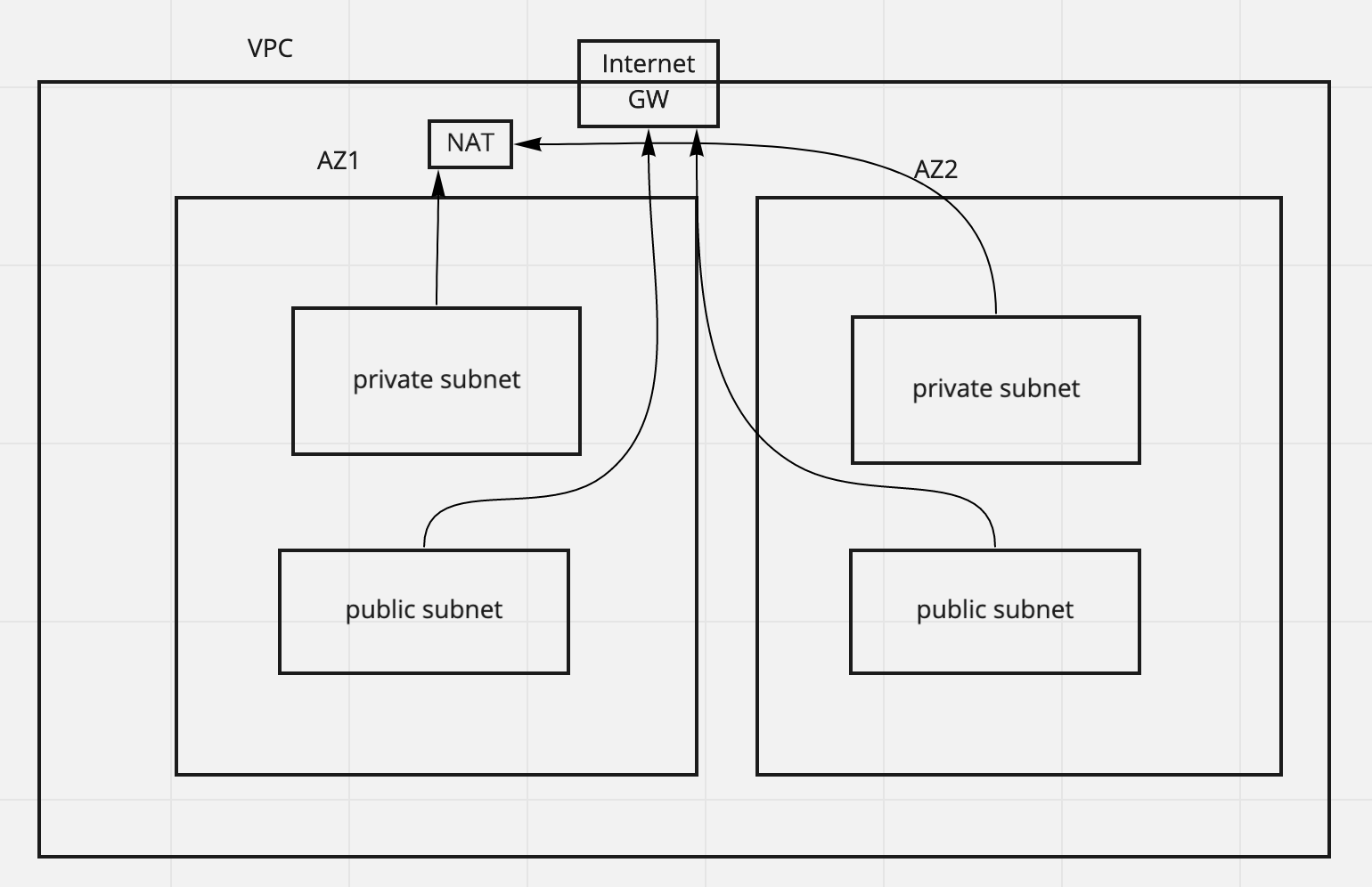
What is EKS fargate cluster-
EKS is a managed service where AWS manage the control plane (master nodes) while users have choice to either to manage their own nodes (EC2 instances) or use Fargate which is a serverless solution where worker nodes are provisioned by AWS automatically. To use fargate we need a fargate profile a profile is a combination of kubernetes namespaces and labels inside them, deployment done with matching namespace and labels(if any) will be scheduled by fargate provisioned node.
Deploy is using eksctl
eksctl create cluster --name my-cluster --version 1.16 --fargate
This will create a VPC with 3 AZs and each AZs having 1 public and 1 private subnet. We can add options to the above command for example we can define vpc cidr by specifying –vpc-cidr . We can also use existing subnets to be used rather than creating new one.
This command will also create fargate profile for default and kube-system namespace. As we see above it is important to create a fargate profile with proper namespace to get the pods scheduled.
At this point a working cluster should be ready we can use kubectl to deploy pods. To config kubectl use
aws eks --region region update-kubeconfig --name cluster_name
Pitfall
When I created my own cluster I see despite my cluster state was active I see core-dns pods in kube-system namespace were not deployed and in
a pending state. While I run kubectl describe pods <cordns pod> I see it is defined to be provisioned on ec2 and fargate unable to provision it.
Solution
Run the command below this will patch coredns deployment to run using fargate.
kubectl patch deployment coredns -n kube-system --type json \ -p='[{"op": "remove", "path": "/spec/template/metadata/annotations/eks.amazonaws.com~1compute-type"}]'
What eksctl create cluster command does -
-
Create a VPC with 1 private and 1 public subnet in 3 AZs.
-
Subnets are tagged with
kubernetes.io/cluster/staging=shared. public subnet should havekubernetes.io/role/elb=1so that EKS can create internet-facing ELBs in those subnets. private subnet should havekubernetes.io/role/internal-elb=1so that EKS can create internal elbs ELBs in those subnets. -
Creates a NAT Gateway in the VPC.
-
Attaches private subnets to NAT GW so that worker nodes can access internet but not nodes are not accessible from internet.
Cost calculation
Region eu-west-1
- EKS charges $0.10 per hour.
- NAT charges $0.048 per hour.
- NAT Data processing $0.048 per hour.
- Fargate workloaods are charged based on vCPU usage.